Saturday, 21 March 2015

The Service on local computer started and then stopped ,Some services stop automatically if there are not in use by other services or programs

In my case, the windows service was working fine on Local, but while deploying on another machine. I created the service using SC commands which was done successfully, but on starting the service, I got this error.

Solution that worked for me:
1) On my local computer, cleared the data of Debug and Release folders in both bin and obj directories.

2) Then deployed, created and started the service successfully.

Run multiple SQL scripts in order using a batch file

Suppose, we have to run following sql files in the order:


1) CREATE_TABLES.sql
2) TABLE_INSERTS.sql
3) CREATE_INDEXES.sql
4) CREATE_PROCEDURES.sql

and suppose they are all present in the directory:
C:\Users\Arjun\Documents\SQL Server Management Studio\BATCheck


Now, create a script say CREATE_DB.sql 
SET NOCOUNT ON
GO

PRINT 'CREATING DATABASE'
IF EXISTS (SELECT 1 FROM SYS.DATABASES WHERE NAME = 'HELLODB')
DROP DATABASE HELLODB
GO
CREATE DATABASE HELLODB
GO

USE HELLODB
GO
:On Error exit

:r "C:\Users\Arjun\Documents\SQL Server Management Studio\BATCheck\CREATE_TABLES.sql"
:r "C:\Users\Arjun\Documents\SQL Server Management Studio\BATCheck\TABLE_INSERTS.sql"
:r "C:\Users\Arjun\Documents\SQL Server Management Studio\BATCheck\CREATE_INDEXES.sql"
:r "C:\Users\Arjun\Documents\SQL Server Management Studio\BATCheck\CREATE_PROCEDURES.sql"

PRINT 'DATABASE CREATE IS COMPLETE'
GO


If HELLODB already exists and you don't want to drop it, then remove the highlighted code above.

Now, create a new file, add the following code and save as demo.bat:

if HELLODB already exists:
SQLCMD -E -d HELLODB -i "C:\Users\Arjun\Documents\SQL Server Management Studio\BATCheck\create_db.sql"
PAUSE

if HELLODB does not exist:
SQLCMD -E -d master -i "C:\Users\Arjun\Documents\SQL Server Management Studio\BATCheck\create_db.sql"
PAUSE

Now, double click the demo.bat file and all the sql scripts will get executed.

Friday, 20 March 2015

How to create, start, stop and delete a Windows Service using SC commands

1) First go to the directory where the Windows Service executable (.exe file) is present.

2) Open Command Prompt.

3) To create service, enter the following command:

sc create DemoServiceName binpath= "C:\Users\Arjun\Documents\Visual Studio 2013\Projects\WindowsService1\WindowsService1\bin\Debug\WindowsService1.exe"

where,  DemoServiceName = name of the windows service


4) Click Start button, type services.msc and hit enter. You can see the service DemoServiceName  in the list.


5) To start service, enter the following command :

sc start DemoServiceName


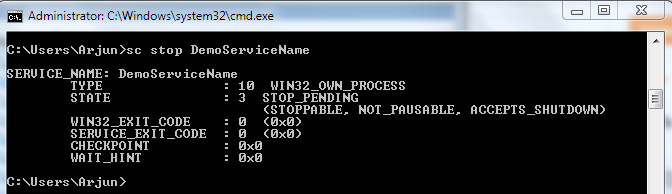
6) To stopservice, enter the following command :

sc stop DemoServiceName


7) To delete service, enter the following command :

sc delete DemoServiceName


Monday, 26 January 2015

warning: dereferencing type-punned pointer will break strict-aliasing rules [-Wstrict-aliasing] in COBOL

I recently installed Open-COBOL in Ubuntu. I wrote a program helloworld.cbl and compiled it using command:

cobc -free -x -o helloworld helloworld.cbl

After compiling the code, I got a bunch of warnings all of which looks like:

warning: dereferencing type-punned pointer will break strict-aliasing rules [-Wstrict-aliasing]

Solution:
To get rid of the warnings, compile the code using command:
     cobc -free -x -O -o helloworld helloworld.cbl


Wednesday, 21 January 2015

Error: syntax error, unexpected "end of file" in COBOL


Key Point:
Each line should end with CRLF (Carriage Return + Line Feed). It means each line should end with '\r\n'.

Solution:
To get rid of the error, copy-paste the code in Notepad++ and do the following steps:

1) Replace '\n' with '' (blank).
2) Replace '\r' with '\r\n'
3) Go to the last line and hit Enter.

Tuesday, 13 January 2015

Select Default Option in DropDownList on PageLoad in ASP.Net using jQuery

<%@ Page Language="C#" AutoEventWireup="true" CodeBehind="Default.aspx.cs" Inherits="DemoGrid.Default" %>

<!DOCTYPE html>
<html xmlns="http://www.w3.org/1999/xhtml">
<head runat="server">
    <script src="Scripts/jquery-1.11.2.min.js"></script>
    <title></title>
</head>
<body>
    <form id="form1" runat="server">
        <script type="text/javascript">
            $(document).ready(function () {
                $("select#DropDownList1 option").filter(function () {
                    return $(this).val() == "0";
                }).prop('selected', true);
            });
        </script>

        <div>
            <asp:DropDownList ID="DropDownList1" runat="server">
                <asp:ListItem Value="0">Select</asp:ListItem>
            </asp:DropDownList>
            <asp:Button runat="server" Text="dummy" />
        </div>
    </form>
</body>
</html>


Clear Multiple Textboxes in ASP.Net on Button Click


<%@ Page Language="C#" AutoEventWireup="true" CodeBehind="Default.aspx.cs" Inherits="DemoGrid.Default" %>

<!DOCTYPE html>

<html xmlns="http://www.w3.org/1999/xhtml">
<head runat="server">
    <title></title>
</head>
<body>
    <form id="form1" runat="server">
        <script type="text/javascript">
            function Clear() {
                var txts = document.getElementsByClassName('txts');

                for (var i = 0; i < txts.length; i++)
                    txts[i].value = '';

                return false;
            }
        </script>

        <div>
            <asp:TextBox ID="txt1" runat="server" CssClass="txts"></asp:TextBox>
            <asp:TextBox ID="txt2" runat="server" CssClass="txts"></asp:TextBox>
            <asp:TextBox ID="txt3" runat="server" CssClass="txts"></asp:TextBox>
            <asp:TextBox ID="txt4" runat="server" CssClass="txts"></asp:TextBox>

            <input type="button" name="name" value=" Clear" onclick="Clear();" />
        </div>
    </form>
</body>
</html>


Enable-Disable a Panel using Javascript in ASP.NET

<%@ Page Language="C#" AutoEventWireup="true" CodeBehind="Default.aspx.cs" Inherits="DemoGrid.Default" %>

<!DOCTYPE html>

<html xmlns="http://www.w3.org/1999/xhtml">
<head runat="server">
    <title></title>
</head>
<body>
    <form id="form1" runat="server">
        <script type="text/javascript">
            function Enable() {
                var controls = document.getElementById("<%=mypanel.ClientID%>").getElementsByTagName("input");

                for (var i = 0; i < controls.length; i++) {
                    controls[i].disabled = false;
                }
            }

            function Disable() {
                var controls = document.getElementById("<%=mypanel.ClientID%>").getElementsByTagName("input");

                for (var i = 0; i < controls.length; i++) {
                        controls[i].disabled = true;
                }
            }
        </script>
            <asp:Panel ID="mypanel" runat="server">
                <asp:TextBox runat="server" />
                <asp:TextBox runat="server" />
                <asp:CheckBox Text="text" runat="server" />
                <asp:Button runat="server" Text="Dummy" />
            </asp:Panel>
            <input type="button" name="name" value=" Disable" onclick="Disable();" />
            <input type="button" name="name" value=" Enable" onclick="Enable();" />
    </form>
</body>
</html>

Monday, 5 January 2015

Cannot login to Sql Server using Windows Authentication


I had the same problem. When I tried to login the Sql Server with Windows Authentication, following error message was displayed :


Monday, 22 December 2014

Geocoding and Reverse Geocoding using JavaScript

geocoding.js
function initialize(lat, lng, address){
     var latlng = new google.maps.LatLng(lat, lng)
     var mapOptions = {
         center: latlng,
         zoom: 4
     };
       
     var map = new google.maps.Map(document.getElementById("myMap"), mapOptions);
       
     var marker = new google.maps.Marker({
          position: latlng,
          title: address,
         map: map,
       draggable: true
     });
    
     var infotext = address + '
' + 'Latitude: '+lat+' Longitude: '+lng; var infowindow = new google.maps.InfoWindow(); infowindow.setContent(infotext); infowindow.setPosition(new google.maps.LatLng(lat, lng)); infowindow.open(map); } function getLatLng(){ var address = document.getElementById("txtAddress").value; var geocoder = new google.maps.Geocoder(); geocoder.geocode({ 'address': address }, function(results, status){ if (status == google.maps.GeocoderStatus.OK){ var longaddress = results[0].address_components[0].long_name; initialize(results[0].geometry.location.lat(), results[0].geometry.location.lng(), longaddress); } else{ alert('Geocode error: ' + status); } }); }
reverseGeocoding.js
function getAddress(lat, lng){
    var geocoder = new google.maps.Geocoder();
    var latlng = new google.maps.LatLng(lat, lng);
    geocoder.geocode({ 'latLng': latlng }, function(results, status){
    if (status == google.maps.GeocoderStatus.OK){
        if (results[1]){
            var address = results[1].formatted_address;
            alert(address);
        }
         else{
            alert("No results found");
         }
    }
    else {
        alert("Geocoder failed due to: " + status);
    }
    });
}
    
function getLocation() {
    var x = document.getElementById("btnGetAddress");
    if (navigator.geolocation) {
        navigator.geolocation.getCurrentPosition(showPosition);
    }
    else { 
        x.innerHTML = "Geolocation is not supported by this browser.";
    }
}

function showPosition(position) {
   getAddress(position.coords.latitude, position.coords.longitude)
}
default.html
<!DOCTYPE html PUBLIC "-//W3C//DTD XHTML 1.0 Transitional//EN"
    "http://www.w3.org/TR/xhtml1/DTD/xhtml1-transitional.dtd">

<html xmlns="http://www.w3.org/1999/xhtml">
<head>
  <title>Search Location</title>
  <link rel="stylesheet" type="text/css" href="Styles/myStyle.css" />
  <script type="text/javascript" src="https://maps.googleapis.com/maps/api/js?key=">
</script>
  <script type="text/javascript" src="Scripts/geocoding.js">
</script>
  <script type="text/javascript" src="Scripts/reverseGeocoding.js">
</script>
</head>

<body onload="initialize(28.4990296, 77.06971279999993, 'Nagarro Software')">
  <div style="width:1350px">
    <div id="header" style="background-color:#FFA500;">
      <h1 style="margin-bottom:0;"></h1>

      <center>
        <h1 style="margin-bottom:0;">Location Provider</h1>
      </center>
    </div>

    <div id="left-column" style=
    "background-color:#FFD700;height:540px;width:155px;float:left;">
      <a href="default.html">Geocoding</a><br />
      <p><a href="#" onclick="getLocation()">Reverse Geocoding</a><br /></p>
    </div>

    <div id="content" style="background-color:#EEEEEE;float:left;style=" width:=""
    height:="">
      <div style="width:500px;">
        <input id="txtAddress" type="text" class="textbox" placeholder=
        "Enter address here..." /> <input id="btnGetLatLng" type="button" class="button"
        value="Submit" onclick="getLatLng();" />
      </div>

      <div id="myMap" style="width: 1160px; height: 505px;"></div>
    </div>

    <div id="footer" style="background-color:#FFA500;clear:both;text-align:center;">
      © Arjun sunel
    </div>
  </div>
</body>
</html>
myStyle.css
body
{
 background-color: gray;
}

input.button
{
 background-color: blue;
 color:white;
 font-family: "Segoe UI";
 border: 0px none;
 font-size: 100%;
 height: 2.142em;
 min-width: 6em;
 width:150px
}

input.textbox
{
 border: 1px solid #BABABA;
 color: #212121;
 font-family: "Segoe UI";
 font-size: 100%;
 padding: 4px 8px;
 width:325px;
 height:22px;
 z-index: 6
}

Sunday, 21 December 2014

How to type Reverse Alphabet in less than 2 seconds?

I used the exact same method to type the alphabets in reverse order as explained in this post. It got me the timing of 1.73 seconds.

Wednesday, 17 December 2014

Find root using Halley's Method

#include<stdio.h>

#define F(x) (x*x - x -6)
#define F_PRIME(x) (2*x - 1)
#define F_DOUBLE_PRIME(x) (2)
#define MAX_ITER 100

float Halley(float x0)
{
    int iter = 0;
    float x1;
    
    while(iter < MAX_ITER)
    {
        x1 = x0 - (2 * F(x0) * F_PRIME(x0)) / (2 * F_PRIME(x0) * F_PRIME(x0) - F(x0) * F_DOUBLE_PRIME(x0));
        x0 = x1;
        iter++;
    }
    return x0;
}

int main()
{
    printf("Finding root of a continuous function using Newton's method.\n");
    
    float x0 = 1;
    printf("Root of the given function is : %f\n", Halley(x0));
    return 0;
}

Find root using Newton's method

#include<stdio.h>

#define F(x) (x*x - 4)
#define FPrime(x) (2*x)
#define MAX_ITER 100

float Newton(float x0)
{
    int iter = 0;
    float x1;
    
    while(iter < MAX_ITER)
    {
        x1 = x0 - F(x0)/FPrime(x0);
        x0 = x1;
        iter++;
    }
    return x0;
}

int main()
{
    printf("Finding root of a continuous function using Newton's method.\n");
    
    float x0 = 1;
    printf("Root of the given function is : %f\n", Newton(x0));
    return 0;
}

Find root using False Position Method

#include<stdio.h>
#include<math.h>

#define F(x) ((2*x)+1)
#define ERROR 0.00001
#define MAX_ITER 1000

float FalsePosition(float a, float b)
{   
    float c;
    int iter = 0;
    do
    {
        c = b - F(b) * (b - a) / (F(b) - F(a));

        printf("F(a): %f, F(b) : %f, F(c) : %f, a: %f, b : %f, c : %f\n", F(a), F(b), F(c), a, b, c);

        if((F(c) > 0 && F(a) > 0) || (F(c) < 0 && F(a) < 0))
        {
            a = c;
        }
        else
        {
            b=c;
        }

        iter++;
    }
    while(fabsf(F(c)) > ERROR && iter < MAX_ITER);
    return c;
}

int main()
{
    float a = -2.5;
    float b = 2.5;

    printf("Finding root in the interval [%f, %f]\n", a, b);

    if((F(a)>0 && F(b)>0) || (F(a)<0 && F(b)<0))
    {
        printf("No root lie in the interval [%f, %f]", a, b);
    }
    else
    {
        printf("The root is : %f\n", FalsePosition(a, b));
    }

    return 0;
}

Find root using Bisection Method

#include<stdio.h>
#include<math.h>

#define F(x) ((2*x)+1)
#define ERROR 0.00001

float Bisection(float a, float b)
{ 
 float mid;
 do
 {
  mid = (a+b)/2;
  printf("F(a): %f, F(b) : %f, F(mid) : %f\n", F(a), F(b), F(mid));

  if((F(mid)>0 && F(a)>0) || (F(mid)<0 && F(a)<0))
  {
   a = mid;
  }
  else
  {
   b = mid;
  }
  
  
 } while(fabsf(F(mid)) > ERROR);
 
 return a;
}

int main()
{
 float a = -2.5;
 float b = 2.5;
 
 printf("Finding root in the interval [%f, %f]\n", a, b);
 
 if((F(a)>0 && F(b)>0) || (F(a)<0 && F(b)<0))
 {
  printf("No root lie in the interval [%f, %f]", a, b);
 }
 else
 {
  printf("The root is : %f\n", Bisection(a, b));
 }
 
 return 0;
}

Tuesday, 16 December 2014

Find MinCut of a Graph using networkx

'''
* Implemented by Arjun sunel.
'''
#Program to find min-cut of a graph using Karger's Algorithm having running time O(n*n*n*n*logn)
import networkx as nx, random, matplotlib.pyplot as plt
def main():
 G =nx.MultiGraph()     #defining graph
 G.add_edges_from([(1,2),(2,3),(3,4),(4,2),(4,5) , (6,7), ( 7,8) , ( 8,5) , (1,3) , (6,5) , (9, 10) , (10,1) , (9, 1), (5,1) , (5, 11) , (7,5) , (8, 6)  , (10 , 3) , (9, 3) , (11, 7)])  #adding edges
 min_cut(G)  #prints min cut of G        #K = nx.gnm_random_graph(10 , 40) ---> used for creating a random graph
 nx.draw(G)   #plots graph G
 plt.show()   #to show graph
 
def min_cut(G):  #min-cut function
 u= (G.order())**2 # number of iterations required to ensure that we will get a min-cut
 List=Cut(G)  #initialized List to a Cut of G
 while u>0:   #while loop starts
  if len(Cut(G))<len(List): #comparing current and previous cut's lengths to get minimum of them
   List=Cut(G) 
  u=u-1
 print "min_cut is :", List   #prints min cut
 
def Cut(G):   #function to find a cut of G
 H = nx.MultiGraph()  #declared H and I as multigraphs
 for a,b in G.edges_iter():  # "for loop" for assigning "edges" as "weights" to each edge
  H.add_edge(a,b,weight= (a,b)) 
  
 while H.order()>2: # while loop  until number of nodes becomes 2
  (a,b,d)=random.choice(H.edges(data=True)) #randomly selected edge    

  for e  in H.edges():
   if    e== ( a , b ) : H.remove_edge(a,b )   #removing randomly selected edge

  for i in H.neighbors(b):    #adding and deleting edges during combining two nodes
   j=len(H.get_edge_data(b,i))
   while j>0: 
    H.add_edge( a ,  i  ,  weight=  H.get_edge_data(b,i)[j-1]['weight']   )
    j=j-1
   H.remove_edge(b,i)
  H.remove_node(b)  #while loop ends
  
 cut=[]
 for e in H.edges(data = True):
  cut.append(e[2]['weight']) 
 return cut     #returns a cut of the graph
 
if __name__ == '__main__':
    main()      #calls the main function


Monday, 15 December 2014

Recursive BubbleSort for Array of Structures

#include <stdio.h>
#include <stdlib.h>
#include <string.h>

// enumeration denoting sort type
enum CompareDataType
{
    cmpStringType = 1,
    cmpIntType = 2
};

// Employee structure
struct Employee
{
    char *name;
    int age;
};

// Method to swap two structures by reference.
void Swap(struct Employee *first, struct Employee *second)
{
    struct Employee temp = *first;
    *first = *second;
    *second = temp;
}


int IsLessThan(struct Employee *first, struct Employee* second, enum CompareDataType cmpType)
{
    int res = 0;
    switch (cmpType)
    {
        case cmpStringType:
            res = strcmp(first->name, second->name);
            break;
            
        case cmpIntType:
            res = first->age < second->age ? -1 : (second->age < first->age);
            break;
            
        default:
            fprintf(stderr, "Invalid sort comparison type\n");
            exit(EXIT_FAILURE);
    }
    return res;
}

// Bubble Sort Method
void BubbleSort(struct Employee array[], int size, enum CompareDataType cmpType)
{
    int i, swapped = 0;
    
    if(size <= 1)
        return;
    
    for(i = 0; i < size - 1; i++)
    {
        if (IsLessThan(array+i, array+i+1, cmpType) > 0)
        {
            Swap(&array[i], &array[i + 1]);
            swapped = 1;
        }
    }
    
    if (swapped)
        BubbleSort(array, size-1, cmpType);
}

// Entry point of the program
int main()
{
    struct Employee array[] = {{"John", 45}, {"Mary", 23}, {"Celina", 79}, {"Mike", 41}};
    int arraySize = 4;
    int index;
    
    printf("Before Sorting : \n");
    for(index = 0; index < arraySize; index++)
    {
        printf("(%s, %d) ", array[index].name, array[index].age);
    }
    
    printf("\n");
    
    BubbleSort(array, arraySize, cmpStringType);
    printf("After Sorting by name : \n");
    for(index = 0; index < arraySize; index++)
        printf("(%s, %d) ", array[index].name, array[index].age);
    
    printf("\n");
    
    BubbleSort(array, arraySize, cmpIntType);
    printf("After Sorting by age : \n");
    for(index = 0; index < arraySize; index++)
        printf("(%s, %d) ", array[index].name, array[index].age);
    
    printf("\n");       
    return 0;
}

Sunday, 14 December 2014

Recursive BubbleSort for Array of Strings

#include<stdio.h>
#include<string.h>
/*
* Implemented by Arjun Sunel.
*/

// Method to swap two strings by reference.
void Swap(char **first, char **second)
{
 char *temp = *first;
 *first = *second;
 *second = temp;
}

// Bubble Sort Method
void BubbleSort(char *array[], int size, int swapped)
{
 int i;
 
 if(swapped == 0 || size == 0)
    {
        return;
    }
 
 for(i = 0; i < size - 1; i++)
 {
  swapped = 0;

  if(strcmp(array[i], array[i+1]) > 0)
  {
   Swap(&array[i], &array[i + 1]);
   swapped = 1;
  }
 }
 
 BubbleSort(array, size-1, swapped);
}

// Entry point of the program
int main()
{
 char* array[] = {"dog", "dose", "apple", "baby", "den", "deck"};
 int arraySize = 6;
 int index;

 printf("Before Sorting : \n");
 for(index = 0; index < arraySize; index++)
 {
  printf("%s ", array[index]);
 }  

 printf("\n");
 
 int swapped = 1;
 
 BubbleSort(array, arraySize, swapped);
 printf("After Sorting : \n");
 for(index = 0; index < arraySize; index++)
 {
  printf("%s ", array[index]);
 } 
 
 printf("\n");
 return 0;
}

Recursive BubbleSort for Array of Characters

#include<stdio.h>
/*
* Implemented by Arjun Sunel.
*/

// Method to swap two characters by reference.
void Swap(char *first, char *second)
{
 char temp = *first;
 *first = *second;
 *second = temp;
}

// Bubble Sort Method
void BubbleSort(char array[], int size, int swapped)
{
    if(swapped == 0 || size == 0)
    {
        return;
    }
    
 int i;
 for(i = 0; i < size - 1; i++)
 {
  swapped = 0;
 
  if( array[i] > array[i + 1] )
  {
   Swap(&array[i], &array[i + 1]);
   swapped = 1;
  }
 }
 
    BubbleSort(array, size-1, swapped);
}

// Entry point of the program
int main()
{
 char array[] = {'d', 'a', 'c', 'b'};
 int arraySize = 4;
 int index;
  
 printf("Before sorting : \n");
 for(index = 0; index <= arraySize - 1; index++)
 {
  printf("%c ", array[index]);
 } 
 
 int swapped = 1;
 
 BubbleSort(array, arraySize, swapped);

 printf("\nAfter sorting : \n");
 for(index = 0; index <= arraySize - 1; index++)
 {
  printf("%c ", array[index]);
 } 

 printf("\n");
}


Recursive BubbleSort for Array of Integers

#include<stdio.h>
/*
* Implemented by Arjun Sunel.
*/

// Method to swap two integers by reference.
void Swap(int *first, int *second)
{
 int temp = *first;
 *first = *second;
 *second = temp;
}

// Bubble Sort Method
void BubbleSort(int array[], int size, int swapped)
{
    if(swapped == 0 || size == 0)
    {
        return;
    }
    
 int i;
 for(i = 0; i < size - 1; i++)
 {
  swapped = 0;
 
  if( array[i] > array[i + 1] )
  {
   Swap(&array[i], &array[i + 1]);
   swapped = 1;
  }
 }
 
    BubbleSort(array, size-1, swapped);
}

// Entry point of the program
int main()
{
 int array[] = {5, -12, 14, 7};
 int arraySize = 4;
 int index;
  
 printf("Before sorting : \n");
 for(index = 0; index <= arraySize - 1; index++)
 {
  printf("%d ", array[index]);
 } 
 
 int swapped = 1;
 
 BubbleSort(array, arraySize, swapped);

 printf("\nAfter sorting : \n");
 for(index = 0; index <= arraySize - 1; index++)
 {
  printf("%d ", array[index]);
 } 
 
 printf("\n");
}